Scattered tools leave friend data fragmented
- Broadcasts, surveys, bookings, and sales each run on a different service
- There’s no way to see who responded to what across them
- Time disappears just moving between dashboards
What it does Segment by tag and attribute, and reach only the people you mean to
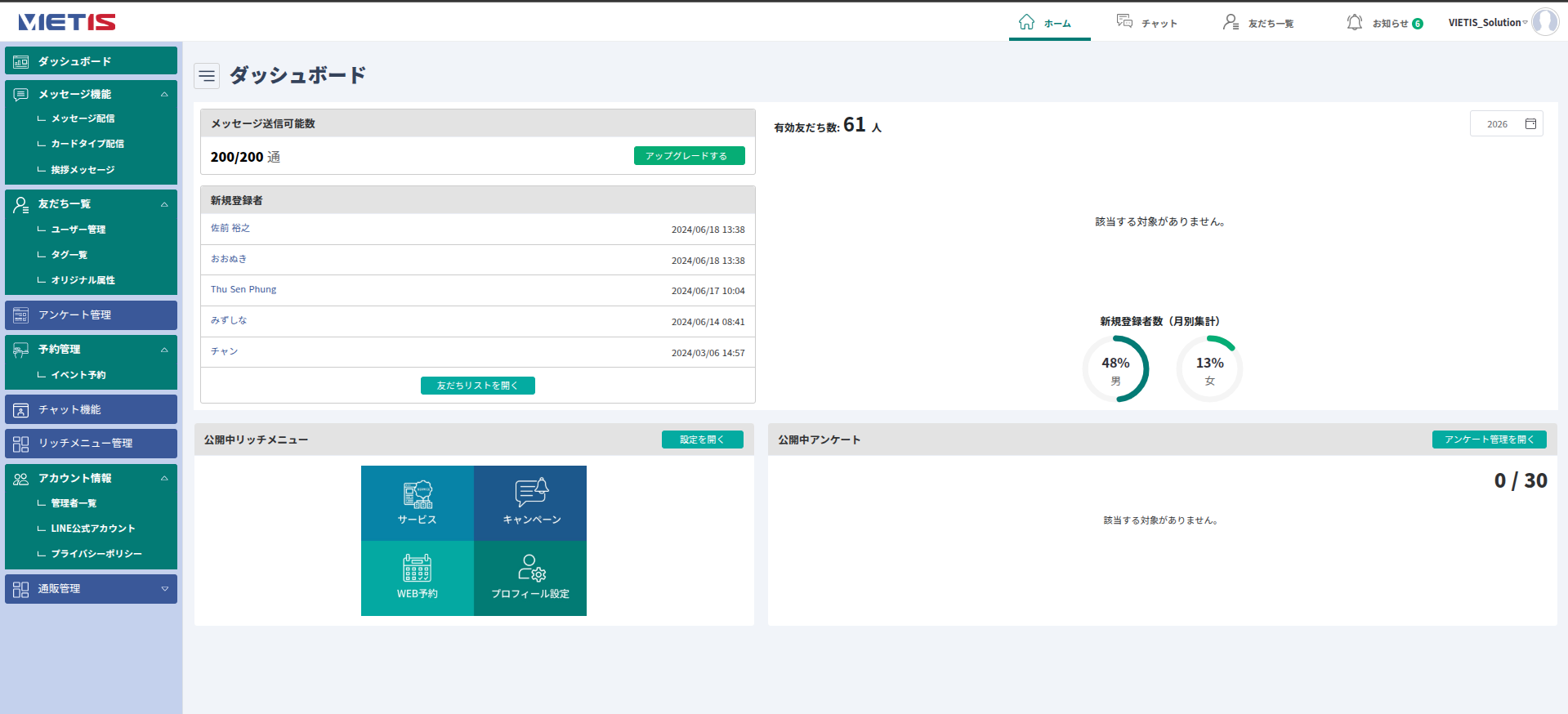
Broadcasts, friend management by tag and attribute, surveys, event bookings, chat, rich menus, and online sales. VIETIS has brought everything you need to run a LINE Official Account into a single dashboard — so you can follow the path from broadcast to purchase or store visit without switching tools.
See the featuresRunning a LINE Official Account usually means a broadcast tool, a survey form, a booking system, and an e-commerce cart, all living apart. This tool brings them into one dashboard and, with friend data at the centre, lets you handle everything from broadcast to purchase or store visit as a single flow.
Message broadcasts, card-type broadcasts, and greeting messages; friend management by tag and custom attribute; surveys, event bookings, chat, rich menus, and online sales (products, categories, orders). Administrator permissions and privacy policy settings live in the same place.
Deliver message broadcasts, card-type broadcasts, and greeting messages to audiences filtered by tag and attribute.
User management, tags, custom attributes, and survey responses, all held as one set of friend data.
Take event bookings, respond one-to-one in chat, vary the rich menu by audience, and manage products and orders.
Launch is the starting point, not the finish line — the tool is designed so you can keep adding features as you run it.
A broadcast tool, a survey form, a booking system, an e-commerce cart. The more separate services you stitch together, the more your friend data fragments and the more day-to-day work piles up — and you’re left without the material you need to reach the right people.
Organise friends with tags and custom attributes, then carry those same conditions straight into broadcasts, surveys, event bookings, and sales. Survey responses and order history attach to the same friend record, so they feed directly into your next segment or a one-to-one chat. Per-administrator permissions let you separate what head office and individual stores can see.
Tags / custom attributes Categorise friends on any axis you like and reuse those conditions for broadcasts, surveys, and bookings — the data stays together however much you scale upFrom connecting your account and designing your friend data, to publishing broadcasts and improving as you go. After launch, VIETIS keeps adding features and refining the tool with you.
Connect your existing LINE Official Account to the dashboard, then set up administrator accounts and the privacy policy. This is where you decide who can touch what.
Decide how you want to categorise friends and set up tags and custom attributes. Every broadcast and survey segment from here on builds on this foundation.
Set up your greeting message and rich menu, then publish message and card-type broadcasts along with surveys and event bookings — the paths your friends can actually act on.
Watch friend growth and engagement on the dashboard and refine your broadcasts. Add what you need step by step — one-to-one chat, online sales, and more.
With broadcasts, friend management, surveys, bookings, and sales in a single dashboard, the path from a new friend to a purchase, a store visit, and a return visit becomes one continuous line.
Broadcasts, friend management, surveys, bookings, chat, rich menus, online sales, and account administration. No hopping between tools — the day-to-day runs entirely from this one screen.
Categorise friends on any axis you like and reuse those conditions to segment broadcasts — concentrating a limited message quota on the people who actually respond.
Responses, sign-ups, and order history all attach to the friend record, ready to use for your next segment or a one-to-one chat.
No app to install, no membership system to build. Bookings, surveys, and purchases all happen inside LINE, straight from the rich menu.
The design assumes you’ll add features as you operate. Start wherever you need to.
Words from customers we have had the opportunity to work with.
We have been working together on a project for more than a year.
We have been greatly helped by VIETIS’s development speed, extensive knowledge, and ability to anticipate the direction of projects even at the consultation stage. VIETIS developers have excellent understanding and communication skills, which has enabled us to move the project forward smoothly. They also provide detailed updates in the software we use to track progress, making it easy for us to understand the current status. Going forward, we would be happy to have more opportunities to exchange ideas and opinions from engineers that emerge during development.
 Benefit One Corporation
We first learned about VIETIS at an offshore development exhibition.
There were quite a large number of offshore vendors exhibiting, and honestly, it was difficult to determine which company would be the right choice. It was at that event that we met Mr. Tan, Vice President. Through our discussions with him, we were impressed by VIETIS’s high technical capabilities and quick response. Above all, there is no doubt that Mr. Tan’s excellent Japanese communication skills were a major factor in our decision to choose VIETIS as our offshore development partner. Regarding the developers, we initially felt that there were differences in technical skill levels. However, this is well compensated for by the depth of their team. Even when a program does not fully meet our requirements, a senior programmer can immediately step in and provide support.
 First Corporation
As we developed our project with VIETIS, we encountered many difficult challenges and obstacles along the way.
However, they always made every effort to overcome them together with us and worked alongside us through every challenge. The celebration we held when we reached a major milestone in the project remains a memorable experience. We hope to see the team further expand with more members who can work together to pursue new technological innovations. VIETIS embodies kindness as an organization, and we hope you will continue to grow into an even larger company without ever losing that quality. No matter how strong your technical capabilities become, please never lose that kindness.
 Lecre Corporation
Come to us even before the problem is fully defined. We listen first, then propose the right way forward.

 VietIS Login
Management Suite
VietIS Login
Management Suite